Skip to content

Separate the actions a human authorized from the actions a 🤖 did.

One hardware-backed passport proves a human is present, your machine is clean, and security checks pass across every repo and server.

Verified: 3 of 3 proofs passing

Action
Toggle proofs to test failure modes
MacBook Pro / macOS / git commit -S
$ git commit -S -m "rotate prod signing keys"

[Touch ID] Confirm commit on Secure Enclave key (App Attest #48)
  Human:     PASS  Touch ID confirmed, app-vouched receipt signed
  Clean:     PASS  3 decoy tripwires watching (~/.ssh, ~/.npmrc, ~/.cargo)
  Practices: PASS  disk_encrypted, os_patched_within:14d, firewall_enabled

Issued 10m laissez:git-signing cert #4821. Commit 9f4c21a signed.

One passport for every repo, server, and team.

Carry one Laissez across every client bastion, private repository, and open-source organization you contribute to. Each service receives its own isolated yes/no scope, teams cannot see each other, and your laptop stays completely yours. Every server you add does see the same device key, so servers that compare notes could tell it is the same device.

Confirm a human is at the keyboard

Commits, SSH logins, and admin sessions are signed by a hardware key inside your Mac Secure Enclave or YubiKey PIV after Touch ID or a physical tap, paired with an Apple App Attest confirmation receipt.

Operation
Sign commit: rotate prod signing keys
Committer
alice@acme.dev
Hardware key
Secure Enclave with Touch ID
Receipt
App-vouched on every use (App Attest #48)

Catch stolen credentials the moment they move

Plant realistic decoy SSH keys and registry tokens offered by each team you authorize into. If malware or a hijacked AI agent scrapes and presents one, the sensor fires and that service's CA revokes access automatically.

SSH key decoy
~/.ssh/id_ed25519_deploy Armed
Registry token
~/.npmrc Armed
Cargo token
~/.cargo/credentials.toml Armed
On trip
Alert CA and auto-revoke device immediately

Verify basic security hygiene without MDM

Your local agent evaluates fresh yes/no posture checks right before issuing a 10-minute certificate. You review and approve the exact checklist per team with zero full-disk scanning or remote wipe.

Disk encryption
FileVault enabled
OS security updates
Patched within 14 days
Firewall and lock
Firewall on, 5m screen lock
Platform integrity
SIP and Secure Boot active
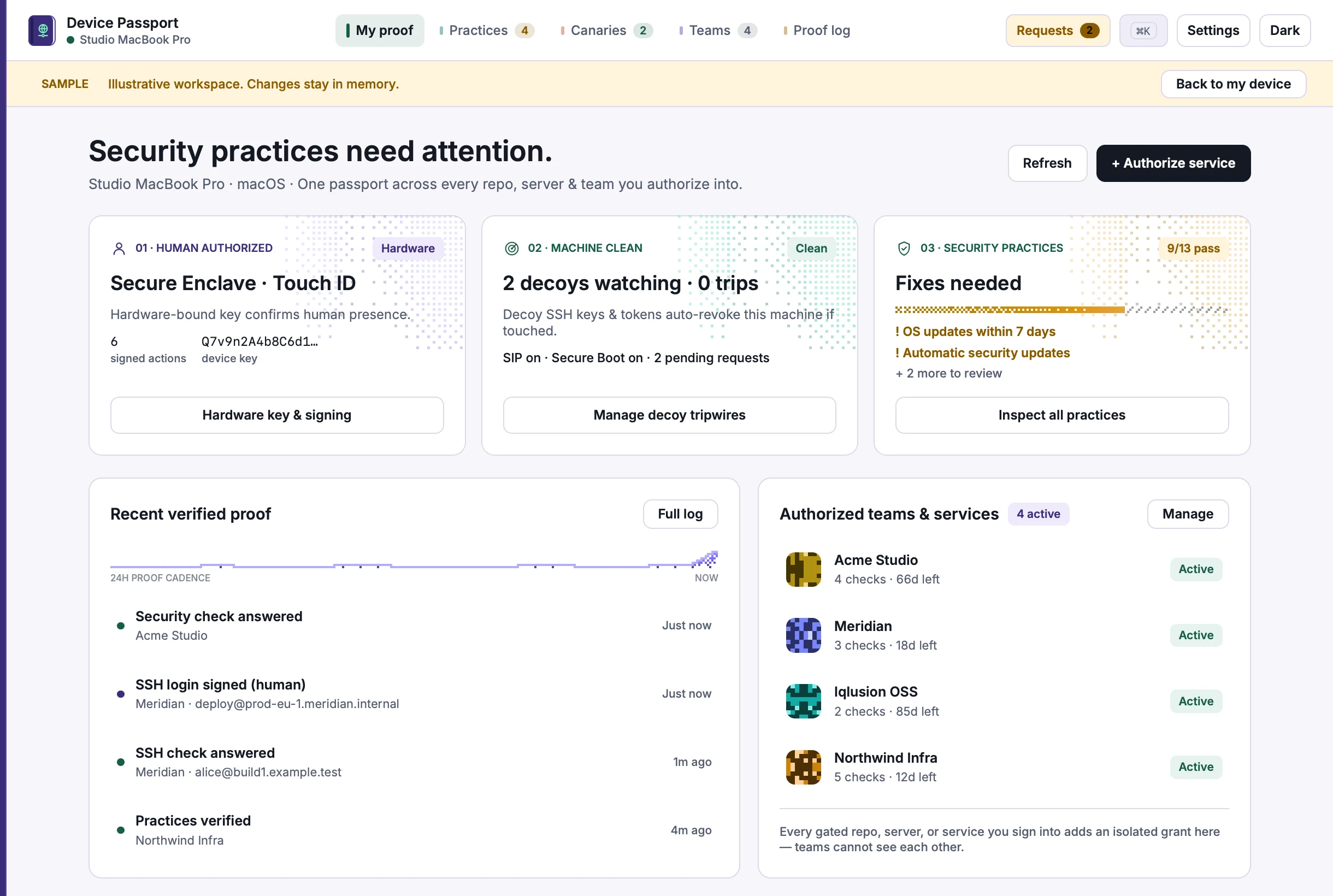
Laissez desktop app showing a personal passport with live proofs for hardware keys, decoy tripwires, security practices, and authorized teams.
Desktop Passport app: One passport on macOS and Linux carrying isolated scopes across every repo, server, and team you authorize into.
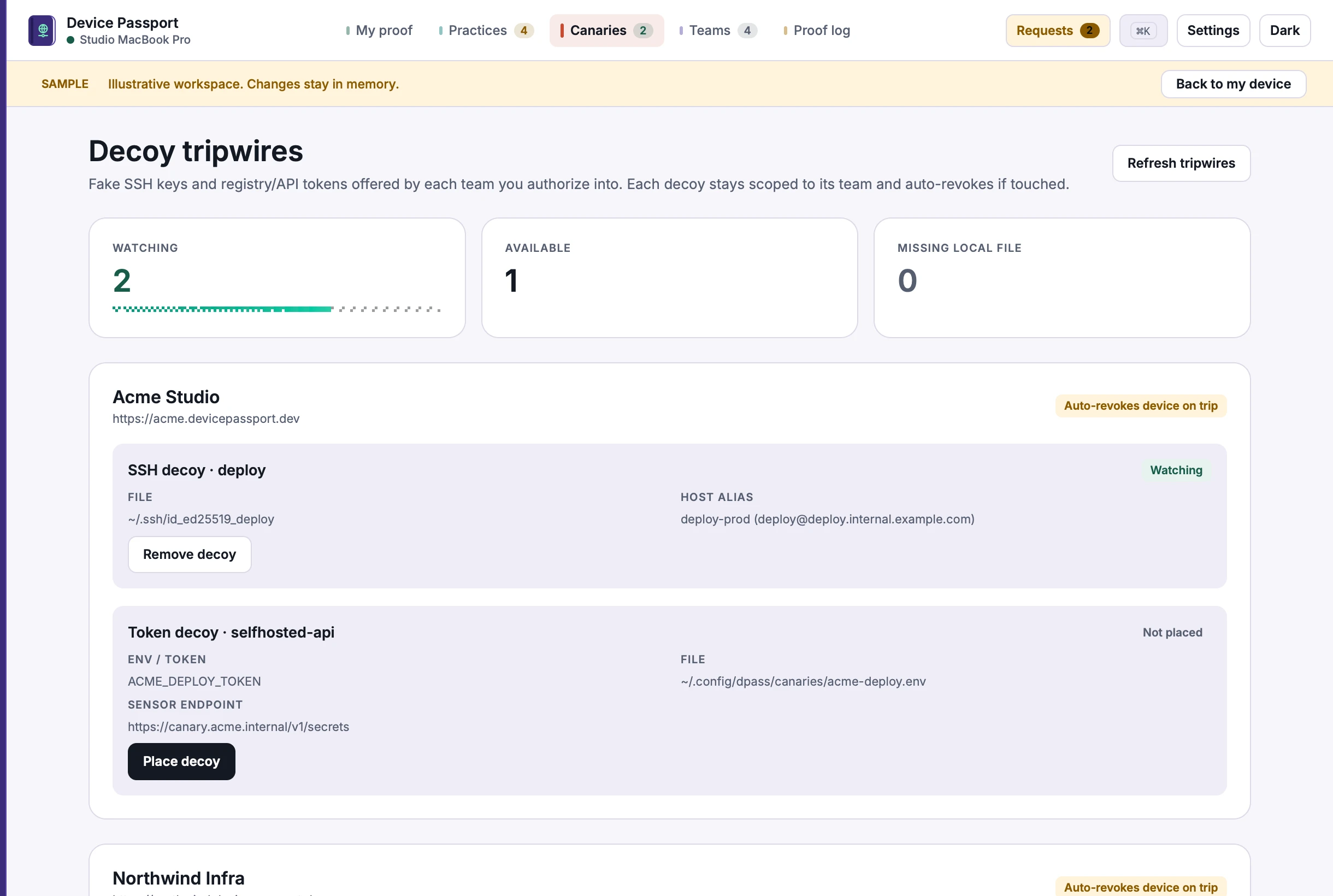
Laissez desktop app Canaries view showing placed decoy SSH keys and API tokens watching for compromise with automatic revocation on trip.
Decoy tripwires: Plant and audit fake SSH keys and registry tokens on disk with explicit consent and zero background spying.

Verify every device from one shared console.

Proving yourself lives on your laptop. Verifying everyone else belongs in a shared web control plane. Manage posture rules, wire up GitHub and SSH gates, watch live decoy tripwires, and revoke compromised machines from anywhere, hosted or self-hosted.

Inspect live proofs and revoke compromised machines

Your team's verifier workspace (acme.laissez.iqlusion.io/console or self-hosted laissez-ca console) tracks hardware keys, decoy tripwires, and fresh posture checks with instant revocation if anything trips.

Contributor Human key Machine clean Security practices Gate status
alice@acme.dev mbp-alice-7Hq2, production Secure Enclave, Touch ID 3 decoys watching, 0 trips All 6 checks passing Admitted (8m left)
bruno@acme.dev tp-bruno-Xc91, staging TPM 2.0 and YubiKey PIV 2 decoys watching, 0 trips All 6 checks passing Ready
dana@acme.dev fw-dana-9Pzt, blocked Software key 2 decoys watching, 0 trips Disk not encrypted Blocked
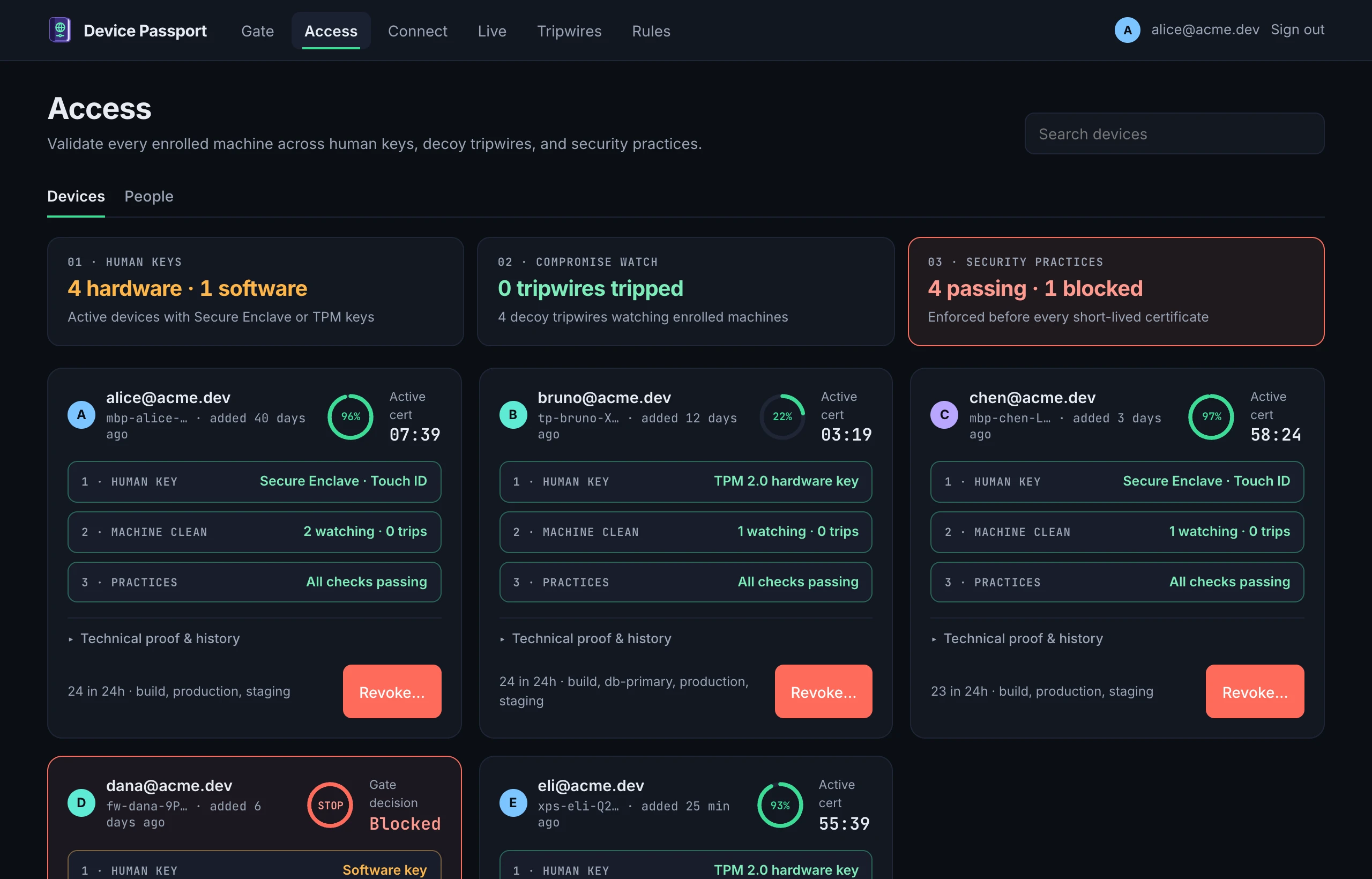
Hosted Laissez verifier web app Access view showing enrolled devices with live certificate countdowns and one-click revocation.
Access overview: Inspect every device's hardware key, decoy tripwires, and passing practices, or revoke access in one click.
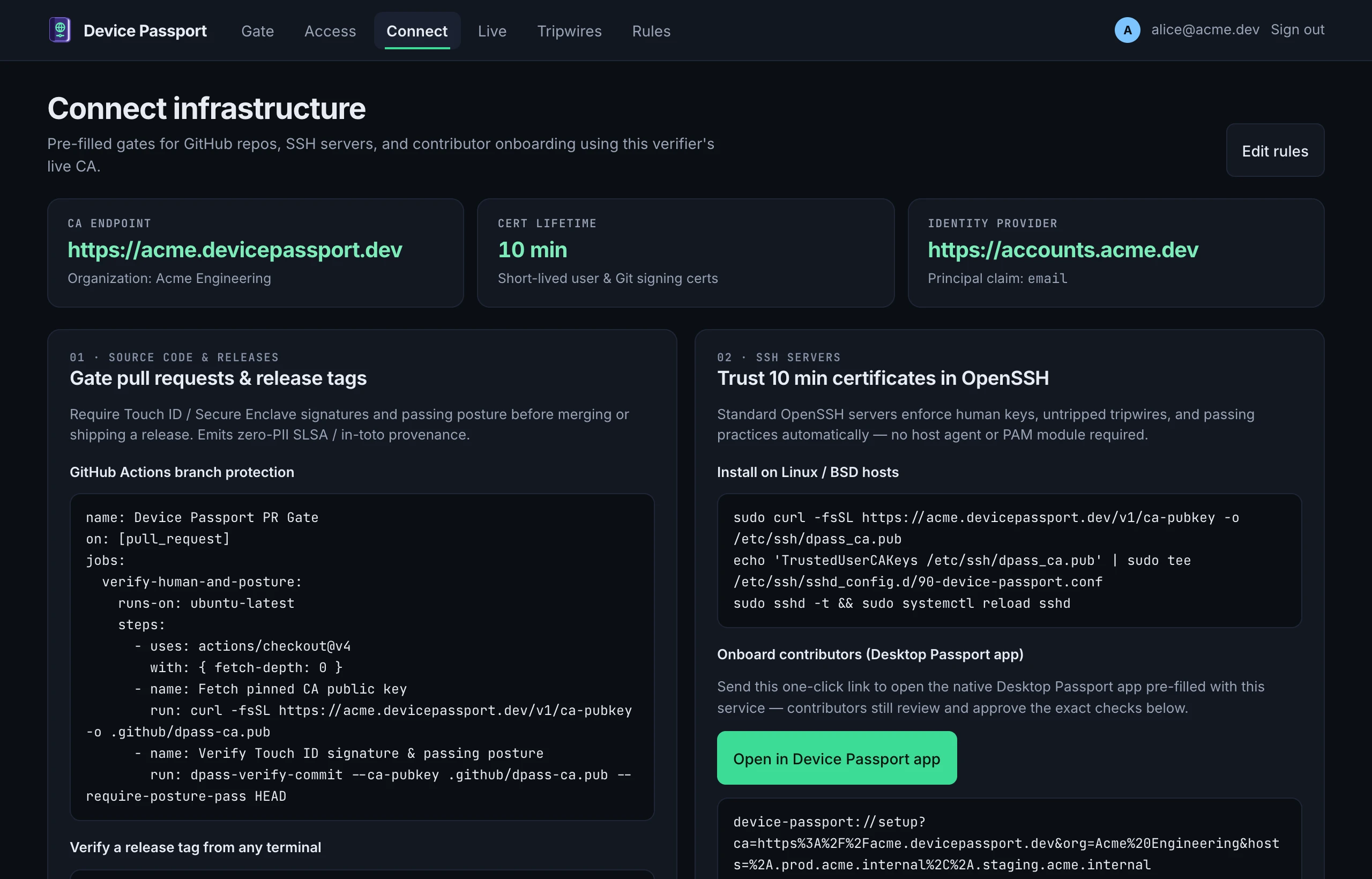
Hosted Laissez verifier web app Connect Infrastructure view showing pre-filled GitHub Actions PR gate YAML and sshd_config setup.
Connect infrastructure: Pre-filled GitHub Actions workflows, sshd_config snippets, and contributor enroll links tied to your CA.

What Laissez refuses to be.

Not MDM

No organization can install software, push profiles, change settings, lock, or wipe your machine. You grant scoped yes/no answers per team and revoke them in one click.

Not EDR spyware

No kernel surveillance pipeline streaming your files or browser history to a third-party cloud. Every question a team asks is logged locally in a hash-chained audit trail.

Not trust-me theater

Hardware keys (Secure Enclave with Apple App Attest, YubiKey PIV, TPM), short-lived 10-minute certificates, and decoy credential tripwires back every access decision.

Deploy either side in minutes.

Open-source Apache-2.0 Rust binaries and native macOS signer that run on your infrastructure with zero vendor lock-in.

Enroll your laptop

Desktop Passport app on macOS and Linux

Terminal or setup link
# One-click desktop app setup link (macOS and Linux):
open 'laissez://setup?ca=https%3A%2F%2Facme.laissez.iqlusion.io'

# Or authorize from the terminal:
laissez enroll https://acme.laissez.iqlusion.io
laissez canaries place --yes
laissez git setup https://acme.laissez.iqlusion.io
Read the device setup guide →

Run a team verifier

Multi-tenant hosted service or self-hosted CA

Server commands
# Run multi-tenant hosted verifiers (*.laissez.iqlusion.io):
laissez-hosted serve --config /etc/laissez-hosted/laissez-hosted.toml

# Or self-host a single team CA and web console:
sudo laissez-ca init --dir /etc/laissez-ca
laissez-ca serve --config /etc/laissez-ca/laissez-ca.toml
laissez-ca console --config /etc/laissez-ca/laissez-console.toml
Read the team verifier guide →

Direct answers to hard questions.

What happens when I contribute to many different teams, clients, or open-source orgs?

That is the core design of a passport. One device holds isolated, per-service grants. The moment you authorize into any gated repo, SSH host, or admin console, you review its exact checks once and add it to your passport. Teams cannot see which other teams you belong to, each team only receives the yes/no answers you approved for it, and revoking one grant never affects the others. Each server does see the same device key, so servers that compare notes could tell it is the same device.

Why is proving in a desktop app while verifying is a hosted web app?

The two jobs have opposite trust boundaries. Proving yourself is single-player and hardware-bound: it needs Touch ID in your Mac Secure Enclave, decoy files sitting on your local disk, and fresh local posture checks. Verifying everyone else is multi-admin and server-backed: configuring OIDC, GitHub branch protection, SSH server policies, canary ingestion, and instant revocation belongs in a shared web workspace (hosted via laissez-hosted or self-hosted via laissez-ca console).

What stops a compromised machine from lying about its posture checks?

Three layers work together: signing keys live inside hardware (Secure Enclave or YubiKey PIV) requiring live human Touch ID or touch on every commit and login, decoy credentials trip immediately if an attacker or stealer scrapes disk secrets, and certificates expire in 10 minutes so revocation takes effect fast. Where TPM or Apple attestation is configured, checks are backed by hardware evidence rather than agent self-reports. See the threat model and App Attest explainer.

How do decoy tripwires catch infostealers and hijacked AI agents?

Laissez plants realistic, non-functional decoy credentials in high-value paths (~/.ssh/, ~/.npmrc, ~/.cargo/credentials.toml, ~/.pypirc, ~/.netrc, and local token files) offered by each team you authorize into. Only their hashes are registered with that team's CA. The instant malware or an unauthorized script presents one to an SSH host or HTTP canary sensor, that CA alerts the affected team and automatically revokes the machine.

Can an organization I contribute to spy on or wipe my personal Mac?

No. Laissez is strictly posture attestation and human-confirmed signing. Each team receives only the scoped yes/no predicate answers you explicitly approved for that team. Nothing in the protocol can modify settings, install software, lock, or wipe your device, and you can revoke any team's grant locally in one click.

Does this require replacing Git, OpenSSH, or GitHub?

No. Git signing uses stock git commit -S with SSH signatures verified by laissez-verify-commit or the GitHub Action. Server logins use stock ssh and sshd via a single TrustedUserCAKeys line. Web admin consoles and Tailscale integrate via the built-in OIDC broker and posture attribute exporter.